URLJumper V2: 2 years of improvements
Repo: https://github.com/BrianWeiHaoMa/URLJumper.
Want a better version of browser bookmarks/favorites that is blazing fast and keyboard-oriented? URLJumper’s got you.
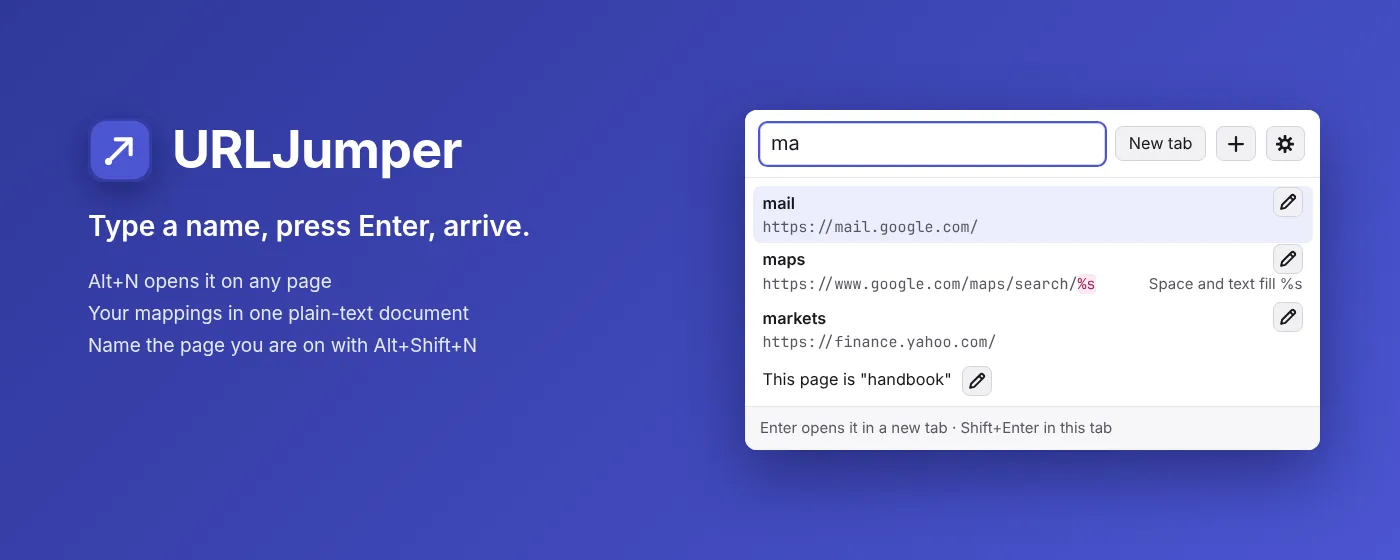
The main pain points I made this browser extension to tackle are:
- I have MANY websites that I would like to save (let’s say 100+).
- Many of those websites have hard-to-remember names like IPs or nonsensical names (e.g., http://192.168.1.211:8096 or https://lpppq192tv.com).
- I love speed and responsiveness and am used to using keyboard shortcuts.
- I want to be able to carry the mappings of my favorite websites in a universal file wherever I go so I don’t have to rederive them.
Of course, years later, I added many other cool functions to make URLJumper more coherent as a product, but the origin of the extension stems from those main pain points that I had years ago.
This is one of the most elegant projects that I’ve done to date. Elegant in the sense that it is high-leverage - the idea is simple and helpful, and the implementation is not disproportionately difficult, relative to what we are trying to accomplish. The original URLJumper was completely manually coded and only totalled ~1600 LoC, as far as I remember. Now it is much more than that because I’ve added many more features, but the primitive functionality that it offers was already there since the first version (things like URL mappings).
URL mappings are a powerful and simple form of indirection with URLs. A simple example: Suppose I mapped benefits -> (current company’s benefits page’s URL). This means that I no longer have to remember that URL or website name, and every time I want to check my benefits, I just need to remember benefits (autocomplete probably shows it after typing b anyway, so it’s even easier than that). If I move to another company, all I need to do is change the URL that benefits is mapped to, and nothing that I need to remember changes (I can still use benefits like before).
In particular, mappings work very well with text files, and text files are very powerful. I managed to create a text file-based storage scheme that allows for sectioning and comments in practically every realistically foreseeable usage path. A testament to its robustness is the fact that I was able to make URLJumper V2 and introduce a convenient GUI for adding mappings that worked perfectly with the pre-existing text file strategy without breaking the old format and without any new constraints/changes introduced. As a developer, it feels great when the original decisions that set your base years ago turn out to be the correct choices and any future development is not constrained by past mistakes. Although URLJumper is one of my smaller projects, I believe it is the most elegant project I’ve done to date, and it will forever have a place in my heart as the first project in which “Everything magically fell into place”.
“Everything magically fell into place” does not mean that I didn’t learn anything from the project. One of the things I am most proud of about this project is its UI design. I use URLJumper myself every day, so I know what a user wants from such a tool. As such, I’ve polished the UI to my liking. Things that were annoying were any buttons placed at the bottom of a view where the top of the view could grow. Why put a button at the bottom if its position could change depending on the size of the list above? Thus, these buttons are positioned nicely at the top. What buttons can obviously be represented by icons such that (1) the space taken up by the button is reduced, and (2) the icon is obvious enough to convey the meaning such that words are not needed? Things like the + button and gear icon were added. The popup does not give you a large surface area to work with, so button decisions must be made optimally. Which mappings are suggested first? Smart ordering was introduced along with the option of keeping the text file’s top-down ordering for priority. I could go on and on about the UI decisions that were made to get URLJumper to where it is today. If I made a bad UI decision, I would feel it myself the next day - that’s what made every UI decision so important.